Podcast Addict: Podcast player
Xavier Guillemane - Podcast & Radio AddictMusic & Audio
4.669.93K Reviews
- Version
- Varies With Device
- Installs
- 10.00M
- Age Rating
- Teen
Screenshots
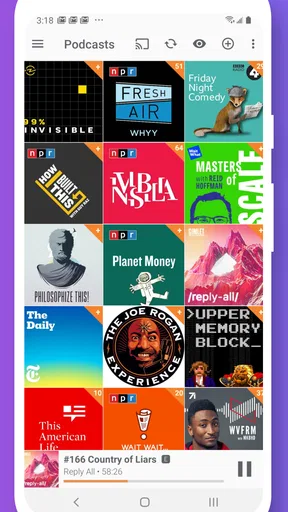
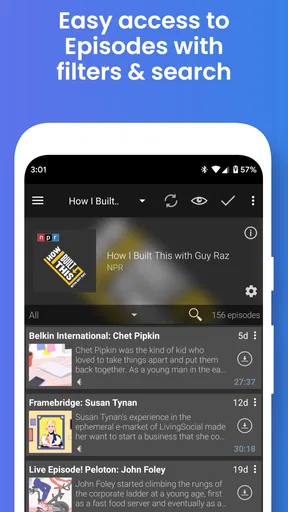
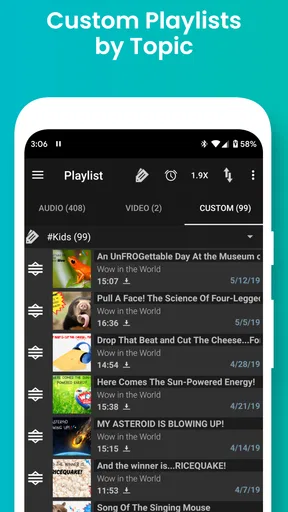
Our Review of Podcast Addict: Podcast player
 Analysis by Appyee
When I want a podcast player that can handle more than a short list of subscriptions, I look for two things: a reliable routine for keeping episodes organized and enough control to make listening fit my day. Podcast Addict is built for that kind of hands-on use. It’s a free music and audio app from Xavier Guillemane - Podcast & Radio Addict, and its long history in the category shows in the range of listening tools it brings together. I’d recommend it most to people who enjoy shaping their own podcast library rather than simply pressing play on a handful of shows.
A listening routine that scales
My practical starting point is to add a few shows I already know, then spend a little time deciding how I want to keep up with them. A podcast app can feel messy when every new episode lands in one undifferentiated pile. Podcast Addict makes more sense when I treat subscriptions as a working library: I choose what I’m following, keep an eye on what is ready to play, and use a queue or playlist when I want to plan a particular stretch of listening.
That approach is useful on a normal weekday. I might pick a longer episode for a walk, then line up a shorter one for a break. Before heading out, I can arrange the listening I want and use automatic downloads to prepare for time away from a stable connection. The benefit is less about having a huge collection and more about not having to make a fresh decision every time I have a spare half-hour.
There is a trade-off: a flexible library asks for a bit of attention. If I subscribe to every show that catches my eye and never tidy up, the app can feel busier than a minimalist player. I’d add shows gradually, listen to how their release schedules fit my routine, and remove subscriptions that have stopped earning their place. That small habit helps keep the main listening choices manageable.
Getting Started with Podcast Addict
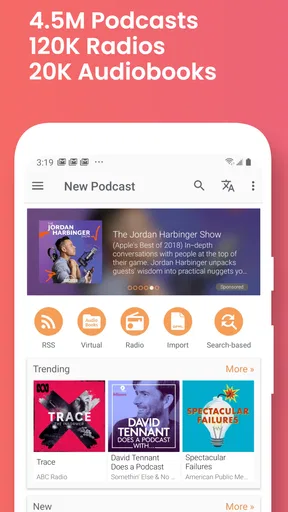
First things first, downloading Podcast Addict was a breeze. Available on both Android and iOS, it took only a few taps to get started. Once I opened it, I was greeted with a clean and intuitive interface that made navigation feel like second nature. The app quickly impressed me with its vast library, boasting over a million podcasts. I felt like a kid in a candy store!
Exploring the Features
What struck me immediately was the app’s ability to personalize my experience. From the outset, I could customize my homepage to showcase my favorite shows and genres. The app even suggests new podcasts based on my listening habits, which is a nifty little feature that keeps things fresh. You know that feeling when you discover a new favorite show? Yeah, this app makes that happen a lot.
The search functionality is seriously impressive. Whether you're looking for a specific episode or just browsing new topics, the app's search engine is both swift and accurate. Plus, it supports a range of languages, which is perfect if, like me, you’re into multilingual content.
Settings that improve everyday listening
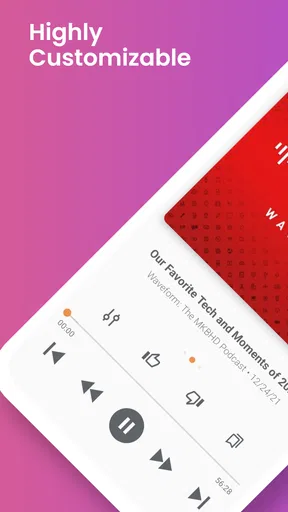
I wouldn’t rush straight into changing every playback option. Instead, I’d try the speed control on a familiar show first: it’s easier to judge whether a faster pace still sounds natural when I know the speaker’s usual rhythm. For interviews or language practice, I often prefer a modest adjustment over racing through an episode. The volume boost can also be useful when a recording sounds quieter than the one before it, though I’d use it selectively rather than assume every show needs extra volume.
The sleep timer is worth checking before listening in bed. It gives me a way to settle in without leaving an episode running long after I’ve drifted off. For downloads, I’d make a conscious choice about which shows should be ready offline instead of treating every subscription as equally urgent. That’s a practical way to avoid building a backlog of episodes I may never play, while still keeping a commute or trip covered.
Podcast Addict is particularly appealing if you listen across different contexts: a speaker-heavy show at home, a downloaded episode on the move, and a playlist for exercise. I’d take a little time to make the home screen reflect the shows I actually return to, then use playlists for temporary plans rather than turning them into another permanent archive. A small amount of setup pays off because the app’s options are most useful when they match a repeatable habit.
User Experience
Now, onto the actual listening experience. The player itself is packed with features, including playback speed adjustments, a sleep timer, and volume boost. These might sound like small details, but trust me, they make a world of difference during those long listening sessions.
Another standout feature is the ability to create playlists. I love being able to queue up episodes for my morning runs or commutes. Plus, the app allows for automatic downloads, so I never have to worry about being offline during crucial podcast moments. It’s like it knows me!
Faster habits, fewer taps
The biggest time-saver, in my experience, is deciding what happens before I’m in a hurry. I can make a playlist for a recurring situation—such as a run or a drive—then add episodes when I have time to browse. That’s more dependable than searching while walking out the door. I’d also use the home screen as a launch point for familiar shows, rather than repeatedly searching for a title I already know I want to hear.
For a realistic morning routine, I might check new episodes with breakfast, pick one or two that fit the trip ahead, and let automatic downloads handle offline listening. Once I’m on the move, the queue keeps the next choice ready. If plans change, I can switch to another saved episode rather than relying on a live connection. The key is to treat the queue as a short-term plan, not a place to store every interesting episode indefinitely.
This workflow is a good fit for people who listen to several shows with different release patterns. Someone who only plays one daily podcast may find the same preparation unnecessary; a simpler player with a minimal library can be quicker to understand. Podcast Addict’s advantage is that I can shape a more involved routine, while the cost is having more choices to manage.
How it compares with simpler players
Compared with a basic podcast app that emphasizes a short subscription list and straightforward playback, Podcast Addict gives me more room to organize listening and adjust the player. That matters when I move between genres, languages, and offline situations. A simpler alternative may be preferable if I want almost no setup, a very restrained interface, or a listening experience tied closely to another service I already use. I wouldn’t switch just for the sake of having more controls; I’d switch when the extra flexibility solves an actual problem in my routine.
It also helps to separate discovery from curation. Search and recommendations can help me find something new, but they don’t decide whether a show deserves a permanent place in my library. I prefer to try a show, notice whether I return to it, and then keep or remove it accordingly. That keeps the app useful as a personal listening tool rather than turning it into an endless catalogue to browse.
Monetary Considerations
While the app is free, it does come with ads. However, they’re not intrusive, and I barely noticed them after a while. If ads aren’t your thing, there’s a premium version available that removes them entirely. Given the value the app provides, the upgrade is well worth considering.
There are in-app purchases, with items ranging from $0.99 to $109.99, so I’d check what a particular purchase offers before spending. The free starting point makes it easy to see whether the player’s organization and playback controls suit me first. I wouldn’t treat a paid option as necessary for someone who is still deciding whether they want a feature-rich podcast app at all.
Where the flexibility has limits
More controls don’t automatically mean a better experience for everyone. A new listener who wants one obvious play button may find the range of options less comfortable than a stripped-back player. Likewise, if I don’t want to manage subscriptions, queues, downloads, or screen layout, I may prefer an app that makes fewer decisions available. Podcast Addict rewards a little experimentation, but it is not the most natural fit for someone who wants the app to make every organizational choice on their behalf.
I’d also be careful about equating a large catalogue with a perfect discovery process. Search is handy when I have a topic or show in mind, and recommendations can surface possibilities, but I still need to judge whether a result is relevant to me. For a niche subject, I’d search with more than one phrase and review the show’s episodes before subscribing. That avoids filling the library based on a title that sounds right but doesn’t match what I actually want to hear.
The app is rated Teen, and its standing among listeners is strong: it holds a 4.6 average from around 593,000 ratings. It has passed 10 million installs, which suggests that it has found a sizable audience among people who want a dedicated podcast player. Those figures are useful context, but I’d still choose based on my own habits: the best fit depends on whether I’ll use its organizational depth, not simply on how many people have installed it.
Community and Support
One of the aspects that I really appreciate about Podcast Addict is its community feel. The app allows users to leave reviews and ratings for podcasts, which helps when deciding what to dive into next. Additionally, the customer support is responsive and genuinely helpful, which is always a huge plus in my book.
Who I’d recommend it to
I’d point regular podcast listeners toward this app if they follow enough shows that episode organization matters, listen in more than one setting, or want playback controls they can adapt to different kinds of audio. It is also a sensible choice for a multilingual listener who enjoys searching beyond familiar topics. Someone who mainly wants a simple way to play a single show, or who dislikes adjusting settings and maintaining a queue, may be happier with a more basic option.
Podcast Addict has been around since January 10, 2012, and its focus is clear: it is a dedicated audio app for people who want to manage podcast listening rather than treat it as an occasional extra. I find that focus valuable, but it also explains why it may feel like more app than a casual listener needs. The useful question is not whether it has plenty to explore; it is whether I’ll use the tools often enough to justify a more involved setup.
Final Thoughts
In a world where podcasts are becoming a staple for entertainment and learning, having the right app makes all the difference. Podcast Addict doesn’t just meet expectations; it exceeds them. With its robust feature set, user-friendly interface, and extensive library, this app has something for every podcast enthusiast.
So, if you're on the hunt for a reliable and feature-rich podcast player, give Podcast Addict a try. It might just be the app you didn’t know you needed. Happy listening!
Verdict
Strengths of Podcast Addict: Podcast player
- Extensive library of podcasts available.
- Customizable playback options.
- Offline listening supported.
- User-friendly interface.
- Regular updates with new features.
Limitations of Podcast Addict: Podcast player
- Ads in the free version.
- Occasional playback bugs.
- Interface can feel cluttered.
- Limited cloud sync options.
- Requires Android 5.0 or higher.
Similar Picks in This Category
View All
YouTube Music
Google LLC4.4

Samsung Music
Samsung Electronics Co., Ltd.3.8

Spotify: Music and Podcasts
Spotify AB4.3

JioSaavn - Music & Podcasts
Saavn Media Limited4.3

Lark Player:Music Player & MP3
Lark Player Studio - Music, MP3 & Video Player4.6

StarMaker: Sing Karaoke Songs
SKYWORK AI PTE. LTD.4.3
Frequently Asked Questions
What features does Podcast Addict offer for managing podcasts?
Podcast Addict provides a comprehensive suite of features for managing podcasts, including customizable playlists, automatic updates, offline listening, and variable playback speeds. Users can also access advanced search options, episode sorting, and download management. Its user-friendly interface ensures that both beginners and podcast enthusiasts can easily navigate their content.
Is Podcast Addict free to use, or are there in-app purchases?
Podcast Addict is free to download and use, offering a wide range of features without cost. However, it also includes in-app purchases and a premium version that removes ads and provides additional features, such as cloud backup and more customization options. Users can choose based on their preferences and needs.
How does Podcast Addict handle offline listening and downloads?
Podcast Addict excels in offline listening by allowing users to download episodes for playback without an internet connection. The app offers customizable download settings, such as automatic downloads for new episodes and the ability to limit downloads based on Wi-Fi availability, helping manage data usage effectively.
Can I use Podcast Addict to listen to audiobooks and other media?
Yes, Podcast Addict supports a variety of media formats beyond podcasts, including audiobooks, YouTube channels, and RSS news feeds. This versatility makes it a convenient hub for all your audio content needs, enabling seamless integration and playback within a single application.
How user-friendly is Podcast Addict for beginners?
Podcast Addict is designed to be intuitive and user-friendly, making it accessible for beginners. The app provides a straightforward setup process, helpful tutorials, and a clean interface. Users can quickly learn to explore and manage their content, making it a great choice for those new to podcasting.
